
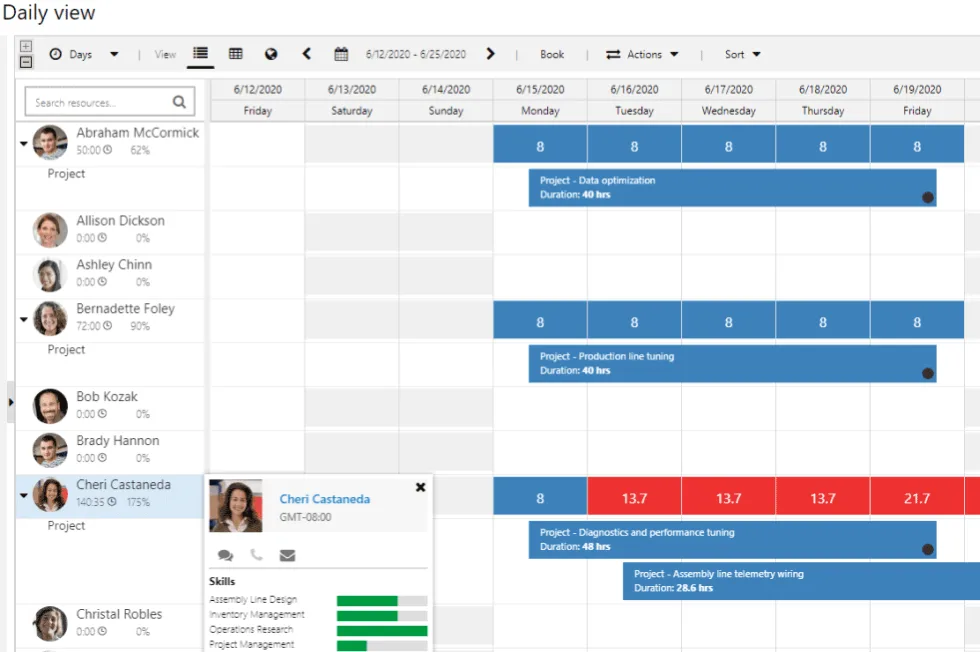
Project Operations is an evolution of the existing project management and accounting modules inside Dynamics 365 Finance as well as the previous Project Service Automation (PSA) solution found in the Sales CRM from Microsoft.
Table of Contents In this Post
- Common Uses of D365 Project Operations
- Limitations of Dynamics 365 Project Operations
- D365 Project Operations Features and Capabilities
- Compare Dynamics 365 Project Operations
- Deployment types
- Project Operations Integrations
- Pricing
- Project Operations and Project Automation
- When to Use Microsoft Dynamics 365 Project Operations
LEARN MORE: Quick Guide on Dynamics 365 Project Operations Functionality
To help your evaluation, this Quick Guide provides a comprehensive comparison between the functionality found in Project Operations and PlanAutomate for D365. Find out if D365 Project Operations is right for your company.

Common Uses for Dynamics 365 Project Operations
Dynamics 365 Project Operations is used in companies that manage multiple ongoing projects that are typically smaller in size, are focused mainly on professional services, and have low complexity.
It is especially beneficial for smaller professional services companies that struggle with consistent planning, tracking of resource hours and expenses, and the related financial processes. These companies need to integrate these projects into their core business operations, including workflow hand-offs and cohesive reporting while balancing multiple projects to satisfy specific requirements.
What if you could get more project management capabilities for the same price?
Get the same features with a better performing system for the same price. Then add where you need it.
Project Operations
$135
user/m
Microsoft’s default project module for D365 Finance with standard project management capabilities with a single WBS structure and basic features. No upgrades or product expansions available.
Key Features
- Project scheduling (WBS)
- Resource & capacity management
- Quoting & Templates
- Costing & Budgeting
- Power BI reporting
vs.
PlanAutomate EPM
$135
user/m
Our core Enterprise Project Management (EPM) product has all the same project management functionality as Project Operations in a more capable system that’s embedded in D365 Finance. Plus, you gain the ability to grow into other features.
Key Features
- Project scheduling (WBS)
- Resource & capacity management
- Quoting & Templates
- Costing & Budgeting
- Power BI reporting
plus
- Faster performance for projects of any size
- Dedicated Cost Breakdown Structure (CBS) with periodization for better cost control
- Enhanced timesheets for streamlined time recording
- Change management controls
- Ability to add on advanced features as you need for your industry or business (see below)
+$USD per user per month paid yearly.
D365 Project Operations Limitations
Project Operations is not a Project Business System
Microsoft built Project Operations to meet the needs of a wide swath of customers who have some project management requirements in their business. However, this will not work for most complex project businesses, or highly project-driven companies.
That is why Microsoft has such a large partner network. Microsoft provides the highly scalable and extensible underlying business platform (Dynamics) and then expects expert partners, like PlanAutomate, to extend the platform to meet the bona-fide needs of the customers.
If you are looking to solve serious problems in your project business, such as problems with cost control, project scheduling and resource planning, risk management, project estimation for large and/or complex projects, Project Operations likely will not meet your needs. That is because Project Operations is not really a project business system. Project Business Solutions or Systems is still a burgeoning category of business solutions and poorly understood by nearly everyone.
The first thing to do is to you consider yourself a project business. Then you will have a better idea of what type of solution will meet your needs.
Article: What is Project Business?
Compare Dynamics 365 Project Operations
To dig deeper into Microsoft’s Project Operation’s capabilities, we decided to compare it to our own PlanAutomate solution, which provides the same capabilities in a more powerful system that can grow with your needs. Our comparison dives into the key capabilities that project-driven companies need.
Our analysis is revealing. See the table below.
|
Project Operations
Microsoft
-
|
PlanAutomate EPM
Base
€135 /mo
|
ETO Manufacturing
Add-on
€60 /mo
|
Construction
Add-on
€60 /mo
|
Professional Services
Add-on
€60 /mo
|
Insight & Analysis
Add-on
€30 /mo
|
Governance
Add-on
€30 /mo
|
Advanced PM
Add-on
€60 /mo
|
Project Modeling
Add-on
€20 /mo
|
Risk Management
Add-on
€20 /mo
|
|
|---|---|---|---|---|---|---|---|---|---|---|
| Insights and analysis | ||||||||||
| Power BI cubes |
✓*
|
✓
|
✕ | ✕ | ✕ | ✕ | ✕ | ✕ | ✕ | ✕ |
| Embedded Power BI reports | ✕ |
✓
|
✕ | ✕ | ✕ | ✕ | ✕ | ✕ | ✕ | ✕ |
| Portfolio analytics | ✕ | ✕ | ✕ | ✕ | ✕ |
✓
|
✕ | ✕ | ✕ | ✕ |
| Portfolio performance | ✕ | ✕ | ✕ | ✕ | ✕ |
✓
|
✕ | ✕ | ✕ | ✕ |
| Performance index | ✕ | ✕ | ✕ | ✕ | ✕ |
✓
|
✕ | ✕ | ✕ | ✕ |
| PlanVector AI | ✕ | ✕ | ✕ | ✕ | ✕ |
✓
|
✕ | ✕ | ✕ | ✕ |
| Planning | ||||||||||
| Work Breakdown Structure (WBS) |
✓*
|
✓
|
✕ | ✕ | ✕ | ✕ | ✕ | ✕ | ✕ | ✕ |
| Gantt & drag and drop |
✓*
|
✓
|
✕ | ✕ | ✕ | ✕ | ✕ | ✕ | ✕ | ✕ |
| Critical path and float |
✓*
|
✓
|
✕ | ✕ | ✕ | ✕ | ✕ | ✕ | ✕ | ✕ |
| Task network |
✓*
|
✓
|
✕ | ✕ | ✕ | ✕ | ✕ | ✕ | ✕ | ✕ |
| Role and resource scheduling |
✓*
|
✓
|
✕ | ✕ | ✕ | ✕ | ✕ | ✕ | ✕ | ✕ |
| Capacity management |
✓*
|
✓
|
✕ | ✕ | ✕ | ✕ | ✕ | ✕ | ✕ | ✕ |
| Soft/hard commit |
✓
|
✓
|
✕ | ✕ | ✕ | ✕ | ✕ | ✕ | ✕ | ✕ |
| Auto assign resources |
✓
|
✓
|
✕ | ✕ | ✕ | ✕ | ✕ | ✕ | ✕ | ✕ |
| Task and Gantt filtering | ✕ |
✓
|
✕ | ✕ | ✕ | ✕ | ✕ | ✕ | ✕ | ✕ |
| Task workflow | ✕ |
✓
|
✕ | ✕ | ✕ | ✕ | ✕ | ✕ | ✕ | ✕ |
| Custom grid views | ✕ |
✓
|
✕ | ✕ | ✕ | ✕ | ✕ | ✕ | ✕ | ✕ |
| Activity backlog | ✕ |
✓
|
✕ | ✕ | ✕ | ✕ | ✕ | ✕ | ✕ | ✕ |
| WBS sensor points | ✕ |
✓
|
✕ | ✕ | ✕ | ✕ | ✕ | ✕ | ✕ | ✕ |
| Manual tasks | ✕ | ✕ |
✓
|
✓
|
✓
|
✕ | ✕ |
✓
|
✕ | ✕ |
| Material planning | ✕ | ✕ |
✓
|
✓
|
✕ | ✕ | ✕ | ✕ | ✕ | ✕ |
| Material constraints | ✕ | ✕ |
✓
|
✓
|
✕ | ✕ | ✕ | ✕ | ✕ | ✕ |
| What-if simulation | ✕ | ✕ |
✓
|
✓
|
✕ | ✕ | ✕ |
✓
|
✕ | ✕ |
| Capacity leveling | ✕ | ✕ |
✓
|
✕ |
✓
|
✕ | ✕ |
✓
|
✕ | ✕ |
| Task driven serviceline and line property | ✕ | ✕ |
✓
|
✕ |
✓
|
✕ | ✕ |
✓
|
✕ | ✕ |
| Custom project/role/task attributes | ✕ | ✕ |
✓
|
✕ |
✓
|
✕ | ✕ |
✓
|
✕ | ✕ |
| Baselines | ✕ | ✕ | ✕ | ✕ | ✕ | ✕ | ✕ |
✓
|
✕ | ✕ |
| Embedded projects (WBS) | ✕ | ✕ | ✕ | ✕ | ✕ | ✕ | ✕ |
✓
|
✕ | ✕ |
| Constraint types | ✕ | ✕ | ✕ | ✕ | ✕ | ✕ | ✕ |
✓
|
✕ | ✕ |
| Gateway reviews and deadline management | ✕ | ✕ | ✕ | ✕ | ✕ | ✕ | ✕ |
✓
|
✕ | ✕ |
| Task tags | ✕ | ✕ | ✕ | ✕ | ✕ | ✕ | ✕ |
✓
|
✕ | ✕ |
| Project calendar | ✕ | ✕ | ✕ | ✕ | ✕ | ✕ | ✕ |
✓
|
✕ | ✕ |
| Project phases | ✕ | ✕ | ✕ | ✕ | ✕ | ✕ | ✕ |
✓
|
✕ | ✕ |
| Schedule backwards from finish | ✕ | ✕ | ✕ | ✕ | ✕ | ✕ | ✕ |
✓
|
✕ | ✕ |
| Estimation | ||||||||||
| Budget versions |
✓*
|
✓
|
✕ | ✕ | ✕ | ✕ | ✕ | ✕ | ✕ | ✕ |
| Templates |
✓
|
✓
|
✕ | ✕ | ✕ | ✕ | ✕ | ✕ | ✕ | ✕ |
| Create from quote |
✓
|
✓
|
✕ | ✕ | ✕ | ✕ | ✕ | ✕ | ✕ | ✕ |
| Create from existing project |
✓
|
✓
|
✕ | ✕ | ✕ | ✕ | ✕ | ✕ | ✕ | ✕ |
| Approvals |
✓
|
✓
|
✕ | ✕ | ✕ | ✕ | ✕ | ✕ | ✕ | ✕ |
| Copy from WBS |
✓
|
✓
|
✕ | ✕ | ✕ | ✕ | ✕ | ✕ | ✕ | ✕ |
| Import/Export XML | ✕ |
✓
|
✕ | ✕ | ✕ | ✕ | ✕ | ✕ | ✕ | ✕ |
| Cashflow | ✕ |
✓
|
✕ | ✕ | ✕ | ✕ | ✕ | ✕ | ✕ | ✕ |
| Qty budgets | ✕ | ✕ |
✓
|
✓
|
✕ | ✕ | ✕ | ✕ | ✕ | ✕ |
| Retainers | ✕ | ✕ | ✕ | ✕ |
✓
|
✕ | ✕ | ✕ | ✕ | ✕ |
| Models | ✕ | ✕ | ✕ | ✕ | ✕ | ✕ | ✕ | ✕ |
✓
|
✕ |
| Cost breakdown structure | ||||||||||
| Embedded projects (CBS) |
✓
|
✓
|
✕ | ✕ | ✕ | ✕ | ✕ | ✕ | ✕ | ✕ |
| Posting status | ✕ |
✓
|
✕ | ✕ | ✕ | ✕ | ✕ | ✕ | ✕ | ✕ |
| EVA principles | ✕ | ✕ | ✕ | ✕ | ✕ | ✕ | ✕ |
✓
|
✕ | ✕ |
| Cost codes & cost code reporting | ✕ | ✕ | ✕ | ✕ | ✕ | ✕ | ✕ |
✓
|
✕ | ✕ |
| Period close | ✕ | ✕ | ✕ | ✕ | ✕ | ✕ | ✕ |
✓
|
✕ | ✕ |
| Costing sheet | ||||||||||
| Cost (view) |
✓
|
✓
|
✕ | ✕ | ✕ | ✕ | ✕ | ✕ | ✕ | ✕ |
| Revenue (view) |
✓
|
✓
|
✕ | ✕ | ✕ | ✕ | ✕ | ✕ | ✕ | ✕ |
| By category |
✓
|
✓
|
✕ | ✕ | ✕ | ✕ | ✕ | ✕ | ✕ | ✕ |
| By category group |
✓
|
✓
|
✕ | ✕ | ✕ | ✕ | ✕ | ✕ | ✕ | ✕ |
| Embedded projects |
✓
|
✓
|
✕ | ✕ | ✕ | ✕ | ✕ | ✕ | ✕ | ✕ |
| CTC and EAC |
✓*
|
✓
|
✕ | ✕ | ✕ | ✕ | ✕ | ✕ | ✕ | ✕ |
| Variance tracking |
✓*
|
✓
|
✕ | ✕ | ✕ | ✕ | ✕ | ✕ | ✕ | ✕ |
| Contract line items (view) | ✕ |
✓
|
✕ | ✕ | ✕ | ✕ | ✕ | ✕ | ✕ | ✕ |
| Dedicated Cost Breakdown Structure (CBS) | ✕ |
✓
|
✕ | ✕ | ✕ | ✕ | ✕ | ✕ | ✕ | ✕ |
| Budget periods | ✕ |
✓
|
✕ | ✕ | ✕ | ✕ | ✕ | ✕ | ✕ | ✕ |
| CBS sensor points | ✕ |
✓
|
✕ | ✕ | ✕ | ✕ | ✕ | ✕ | ✕ | ✕ |
| Variance reason codes | ✕ | ✕ | ✕ | ✕ | ✕ | ✕ | ✕ |
✓
|
✕ | ✕ |
| Deliverables (view) | ✕ | ✕ |
✓
|
✓
|
✕ | ✕ | ✕ |
✓
|
✕ | ✕ |
| Change control (view) | ✕ | ✕ |
✓
|
✓
|
✕ | ✕ | ✕ |
✓
|
✕ | ✕ |
| WBS estimate (view) | ✕ | ✕ |
✓
|
✕ |
✓
|
✕ | ✕ |
✓
|
✕ | ✕ |
| Revenue to complete (view) | ✕ | ✕ |
✓
|
✕ |
✓
|
✕ | ✕ |
✓
|
✕ | ✕ |
| Get WBS estimates | ✕ | ✕ |
✓
|
✕ |
✓
|
✕ | ✕ |
✓
|
✕ | ✕ |
| Retainer | ✕ | ✕ | ✕ | ✕ |
✓
|
✕ | ✕ |
✓
|
✕ | ✕ |
| Burn rate (view) | ✕ | ✕ | ✕ | ✕ | ✕ | ✕ | ✕ |
✓
|
✕ | ✕ |
| Earned value (view) | ✕ | ✕ | ✕ | ✕ | ✕ | ✕ | ✕ |
✓
|
✕ | ✕ |
| RAIDO (view) | ✕ | ✕ | ✕ | ✕ | ✕ | ✕ | ✕ | ✕ | ✕ |
✓
|
| Labor quantities (view) | ✕ | ✕ | ✕ | ✕ | ✕ | ✕ | ✕ |
✓
|
✕ | ✕ |
| Cashflow | ✕ | ✕ | ✕ | ✕ | ✕ | ✕ | ✕ |
✓
|
✕ | ✕ |
| Portfolio organization | ||||||||||
| Stakeholder workspace | ✕ | ✕ | ✕ | ✕ | ✕ | ✕ |
✓
|
✕ | ✕ | ✕ |
| Auto pilot | ✕ | ✕ | ✕ | ✕ | ✕ | ✕ |
✓
|
✕ | ✕ | ✕ |
| Project sensor points | ✕ | ✕ | ✕ | ✕ | ✕ | ✕ |
✓
|
✕ | ✕ | ✕ |
| Stakeholders | ✕ | ✕ | ✕ | ✕ | ✕ | ✕ |
✓
|
✕ | ✕ | ✕ |
| POS security | ✕ | ✕ | ✕ | ✕ | ✕ | ✕ |
✓
|
✕ | ✕ | ✕ |
| Batch lists | ✕ |
✓
|
✕ | ✕ | ✕ | ✕ | ✕ | ✕ | ✕ | ✕ |
| Portfolio management | ||||||||||
| Project portfolios |
✓
|
✓
|
✕ | ✕ | ✕ | ✕ | ✕ | ✕ | ✕ | ✕ |
| Portfolio status | ✕ | ✕ | ✕ | ✕ | ✕ |
✓
|
✕ | ✕ | ✕ | ✕ |
| Portfolio sensor points | ✕ | ✕ | ✕ | ✕ | ✕ |
✓
|
✕ | ✕ | ✕ | ✕ |
| Project breakdown structure | ✕ | ✕ | ✕ | ✕ | ✕ |
✓
|
✕ | ✕ | ✕ | ✕ |
| Project budget periods | ✕ | ✕ | ✕ | ✕ | ✕ |
✓
|
✕ | ✕ | ✕ | ✕ |
| Risk management | ||||||||||
| RAIDO register | ✕ | ✕ | ✕ | ✕ | ✕ | ✕ | ✕ | ✕ | ✕ |
✓
|
| Change management | ||||||||||
| Revisions |
✓
|
✓
|
✕ | ✕ | ✕ | ✕ | ✕ | ✕ | ✕ | ✕ |
| Change orders | ✕ |
✓
|
✕ | ✕ | ✕ | ✕ | ✕ | ✕ | ✕ | ✕ |
| Change requests | ✕ |
✓
|
✕ | ✕ | ✕ | ✕ | ✕ | ✕ | ✕ | ✕ |
| Copy Change set | ✕ | ✕ |
✓
|
✕ |
✓
|
✕ | ✕ |
✓
|
✕ | ✕ |
| Copy WBS | ✕ | ✕ |
✓
|
✕ |
✓
|
✕ | ✕ |
✓
|
✕ | ✕ |
| WBS change sets | ✕ | ✕ |
✓
|
✕ |
✓
|
✕ | ✕ |
✓
|
✕ | ✕ |
| Resource management | ||||||||||
| Resource attributes |
✓
|
✓
|
✕ | ✕ | ✕ | ✕ | ✕ | ✕ | ✕ | ✕ |
| Calendars and exceptions |
✓*
|
✓
|
✕ | ✕ | ✕ | ✕ | ✕ | ✕ | ✕ | ✕ |
| Resource loan management |
✓
|
✓
|
✕ | ✕ | ✕ | ✕ | ✕ | ✕ | ✕ | ✕ |
| Grade, service & location | ✕ | ✕ |
✓
|
✕ |
✓
|
✕ | ✕ | ✕ | ✕ | ✕ |
| Labor rates by grade and service line | ✕ | ✕ |
✓
|
✕ |
✓
|
✕ | ✕ | ✕ | ✕ | ✕ |
| Project resourcing (dispatch) | ✕ | ✕ | ✕ | ✕ | ✕ | ✕ | ✕ |
✓
|
✕ | ✕ |
| Workspaces | ||||||||||
| Project management |
✓
|
✓
|
✕ | ✕ | ✕ | ✕ | ✕ | ✕ | ✕ | ✕ |
| Project team member | ✕ |
✓
|
✕ | ✕ | ✕ | ✕ | ✕ | ✕ | ✕ | ✕ |
| Project costing | ✕ |
✓
|
✕ | ✕ | ✕ | ✕ | ✕ | ✕ | ✕ | ✕ |
| Project planning | ✕ |
✓
|
✕ | ✕ | ✕ | ✕ | ✕ | ✕ | ✕ | ✕ |
| Project change management | ✕ |
✓
|
✕ | ✕ | ✕ | ✕ | ✕ | ✕ | ✕ | ✕ |
| Project capacity management | ✕ |
✓
|
✕ | ✕ | ✕ | ✕ | ✕ | ✕ | ✕ | ✕ |
| Project material constraints | ✕ | ✕ |
✓
|
✓
|
✕ | ✕ | ✕ | ✕ | ✕ | ✕ |
| Project subcontract management | ✕ | ✕ |
✓
|
✓
|
✕ | ✕ | ✕ | ✕ | ✕ | ✕ |
| Project stakeholder | ✕ | ✕ | ✕ | ✕ | ✕ | ✕ |
✓
|
✕ | ✕ | ✕ |
| Project period close | ✕ | ✕ | ✕ | ✕ | ✕ | ✕ |
✓
|
✕ | ✕ | ✕ |
| Project RAIDO | ✕ | ✕ | ✕ | ✕ | ✕ | ✕ | ✕ | ✕ | ✕ |
✓
|
| Subcontract management | ||||||||||
| Subcontract management |
✓
|
✓
|
✕ | ✕ | ✕ | ✕ | ✕ | ✕ | ✕ | ✕ |
| Timesheet management | ||||||||||
| My assignments & widget |
✓
|
✓
|
✕ | ✕ | ✕ | ✕ | ✕ | ✕ | ✕ | ✕ |
| Team member workspace | ✕ |
✓
|
✕ | ✕ | ✕ | ✕ | ✕ | ✕ | ✕ | ✕ |
| My calendar | ✕ |
✓
|
✕ | ✕ | ✕ | ✕ | ✕ | ✕ | ✕ | ✕ |
| Task status update | ✕ | ✕ | ✕ | ✕ | ✕ | ✕ | ✕ |
✓
|
✕ | ✕ |
| My tracked RAIDO | ✕ | ✕ | ✕ | ✕ | ✕ | ✕ | ✕ | ✕ | ✕ |
✓
|
Download our Guide to get all the details and understand exactly what capabilities are included, what you need as a project business, and how to get them with Dynamics 365.
D365 Project Operations Features and Capabilities
Microsoft touts many features and capabilities with Project Operations. Here is a quick summary of what is included.
Project Management
Based on Microsoft Project, Project Operations has a simplified, drag and drop project scheduling tool. It includes dashboards, task management, scheduling, interactive Gantt charts, and work-breakdown structures. It is a planning tool, but not a project execution tool, if that is what you are looking for.
Opportunity Management
Being integrated with Microsoft Sales, CRM, it has a pricing and costing engine to use for deal management.
Resource Management
With a built-in resource profile tool, it allows you to match resources up to project requirements based on skillsets.
Time and Expense Management
Project Operations is focused primarily on professional services organizations. As such, a core feature is a tool to submit time and expense reports via a mobile app or browser.
Project Accounting
Based on the previous version of Dynamics 365 project management and accounting, Project Operations offers some basic accounting functionality to adhere to GAAP or IFRS standards. However, it completely lacks a cost breakdown structure.
Project Dashboards
Project Operations comes equipped with limited visualization tools to help with resource utilization, forecasting and budgeting.
Deployment types
Project Operations offers multiple deployment options. The claim is to match your requirements. However, depending on which you choose, the capabilities provided are very different.
Here are the current deployment types:
- Lite deployment – deal to proforma invoicing
- Project Operations for resource/non-stocked scenarios
- Project Operations for stocked/production order scenarios
The first two options extend the Dynamics 365 Sales application. The third leverages D365 Finance ERP as well. However, these options have very different feature sets. For example, depending on which you choose your may have project scheduling or not, or you may have to use a different tool. Also the functionality may sit inside different end-user applications; some may reside in Sales and other in Finance. Learn more about the D365 Project Operations deployment options here.
Project Operations Integrations
Project Operations has two main integrations with the rest of the Dynamics platform, Finance & Supply Chain, and Sales (CRM). The integration with Dynamics 365 Finance ERP helps lower overhead by streamlining implementation, administration, and management, across different disciplines. This is by far the most compelling integration. The integration with D365 Sales, helps streamline the opportunity estimation process.
However, Project Operations does not integrate with D365 Business Central ERP. Business Central is Microsoft’s SMB ERP, and there are no current plans to offer integration with this application at this time. There may be third-party tools and companies that can offer this integration if needed.
Other integrations with Teams and other Microsoft applications are possible. Dynamics also offers a full REST API for integrations with other applications outside the Microsoft ecosystem.
D365 Project Operations Pricing
As of October 2024, the updated pricing for Project Operations licenses is $135 per user per month. This could vary based on your volume and term. Learn more about Project Operations pricing here.
In contrast, to access all the project business capabilities in PlanAutomate for Dynamics, you only need the Microsoft Team Member license, which is currently $8 per user per month. PlanAutomate does have its own licensing fee, but you will not pay for Project Operations and Project Automation should you choose to go with Project Automation.
Project Operations and Project Automation
Microsoft’s release of Dynamics 365 Project Operations clearly is a move toward Project Automation. The premise of Project Automation systems is to eliminate the silos of applications and data that Project Businesses typically use in favor of one platform that incorporates key Project Business functions, including:
PlanAutomate has been working in the Project Automation space for 12 years, and Microsoft Project Operations is a more simplified addition to the effort.
PlanAutomate and Microsoft D365 Project Operations cater to very different needs. We wrote this article is an attempt to clarify what level of Project Automation solution is right for you.
When to Use Microsoft Dynamics 365 Project Operations
Knowing when Project Operations makes sense for your company requires the answer to a few simple questions.
- Are you a services-based organization?
- Are your projects simple and short in duration?
- Are you happy running your project financials and cost management in spreadsheets?
If you answered yes to all three questions, then Project Operations may work for you.
If you answered anything other than yes for any of the three, you may need to explore other options.
Don’t buy a business system if it doesn’t support your whole business or can’t help you grow in the future. If an application only covers a small portion of your needs but you still need to support the bulk of your processes with ancillary apps, tools and spreadsheets, or make massive custom modifications to it, keep looking.
If your goal is to eliminate the need for those spreadsheets and ancillary applications and be able to manage your project business in one comprehensive business system, then PlanAutomate may right for you.
About PlanAutomate
PlanAutomate is a full-service Microsoft Partner that has been deploying Microsoft Dynamics solutions for project-driven organizations since 2007. It combines the power of the D365 platform with its own scalable project management system.
Work with PlanAutomate if you want to move from fragmented tools and processes to a single, streamlined platform and way of working that integrates all your project business functions. If you are project-driven and currently or are looking to utilize Microsoft Dynamics 365, contact us today to find out if we can help.
