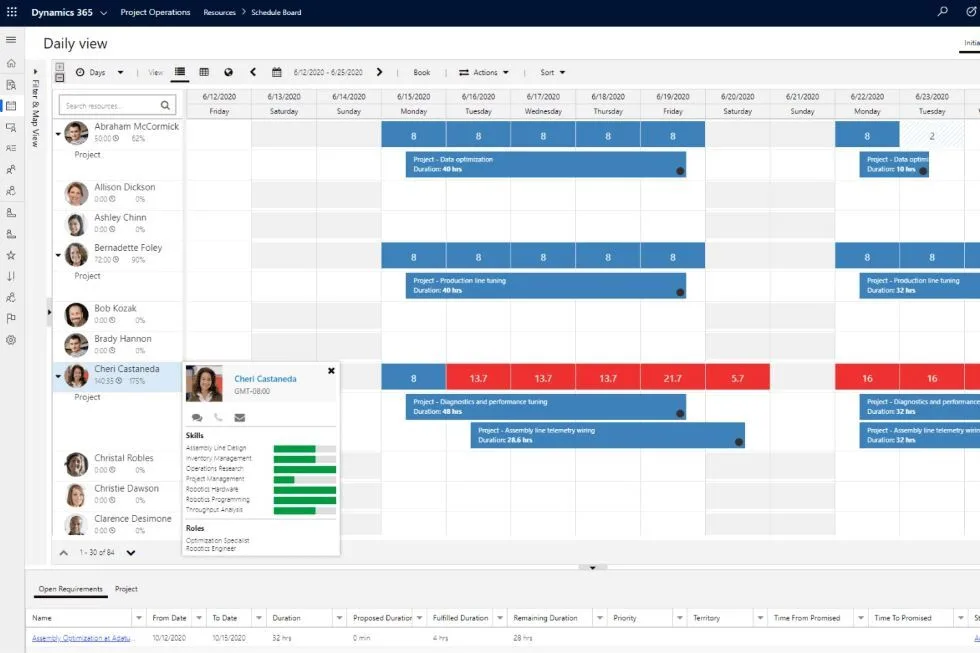
As of October 2024, Microsoft’s Dynamics 365 Project Operations is priced and licensed per user, starting at $135 per user per month for full users and $8 per month for team members.
What if you could get a better project system for the same price?
Get the same functionality as Project Operations in a better system that can grow with you for the same price.
Project Operations
$135
user/m
Microsoft’s default project module for D365 Finance with standard project management capabilities with a single WBS structure and basic features. No upgrades or product expansions available.
Key Features
Project scheduling (WBS)
Resource & capacity management
Quoting & Templates
Costing & Budgeting
Power BI reporting
vs.
PlanAutomate EPM
$135
user/m
Our core Enterprise Project Management (EPM) product has all the same project management functionality as Project Operations in a more capable system that’s embedded in D365 Finance. Plus, you gain the ability to grow into other features.
Key Features
Project scheduling (WBS)
Resource & capacity management
Quoting & Templates
Costing & Budgeting
Power BI reporting
plus
Faster performance for projects of any size
Dedicated Cost Breakdown Structure (CBS) with periodization for better cost control
Enhanced timesheets for streamlined time recording
Change management controls
Ability to add on advanced features as you need for your industry or business (see below)
In contrast, to access all the project business capabilities in PlanAutomate for Dynamics, you only need the Microsoft Team Member license, which is currently $8 per user per month. PlanAutomate does have its own licensing fee, but you will not pay for Project Operations and PlanAutomate should you choose to go with us.
D365 Project Operations Limitations
If you are strongly considering Project Operations for your company, first understand if you are a project business, meaning a company whose primary driver of business is projects. If you are, then you may want to learn more before you make a final decision.
Why Project Operations Doesn’t Work for Most Project Companies – The 20% Rule.
Microsoft built Dynamics 365 following the 20% product design rule, which means that it builds ~ 20 percent of the functionality required for a business sector or industry expecting to meet most of their needs. The 20% product design rule stems from the Pareto Principle that says 80% of any given effect comes from 20% of the effort put into it.
Project Operations is not a Project Business System
With the 20% rule approach, Microsoft has built Project Operations to meet some basic project management needs of a wide base of customers. However, this will not work for most project businesses, or highly project-driven companies.
Project Business Solutions or Systems is still a burgeoning category of business solutions and poorly understood by nearly everyone.
If you are looking to solve serious problems in your project business, such as problems with cost control, project scheduling and resource planning, risk management, project estimation for large and/or complex projects, Project Operations likely will not meet your needs and you should consider a project business system like PlanAutomate.
PlanAutomate is a complete project business solution that can grow with your needs, seamlessly embedded into Dynamics 365. Project Automation combines one of strongest cloud ERP platforms (D365) with the strongest enterprise project business platform.
With the constant release of new AI tools what is the real situation with AI in project management? We are conducting this survey and creating this report to answer that question.
Hear directly from project business leaders and project management professional to understand how AI is being adopted in project management, what are the most beneficial use cases, what are the results.
What are the Dynamics 365 Project Operations Deployment Types
What is Dynamics 365 Project Operations?
Manage Consent
To provide the best experiences, we use technologies like cookies to store and/or access device information. Consenting to these technologies will allow us to process data such as browsing behavior or unique IDs on this site. Not consenting or withdrawing consent, may adversely affect certain features and functions.
Functional
Always active
The technical storage or access is strictly necessary for the legitimate purpose of enabling the use of a specific service explicitly requested by the subscriber or user, or for the sole purpose of carrying out the transmission of a communication over an electronic communications network.
Preferences
The technical storage or access is necessary for the legitimate purpose of storing preferences that are not requested by the subscriber or user.
Statistics
The technical storage or access that is used exclusively for statistical purposes.The technical storage or access that is used exclusively for anonymous statistical purposes. Without a subpoena, voluntary compliance on the part of your Internet Service Provider, or additional records from a third party, information stored or retrieved for this purpose alone cannot usually be used to identify you.
Marketing
The technical storage or access is required to create user profiles to send advertising, or to track the user on a website or across several websites for similar marketing purposes.
To provide the best experiences, we use technologies like cookies to store and/or access device information. Consenting to these technologies will allow us to process data such as browsing behavior or unique IDs on this site. Not consenting or withdrawing consent, may adversely affect certain features and functions.
Functional
Always active
The technical storage or access is strictly necessary for the legitimate purpose of enabling the use of a specific service explicitly requested by the subscriber or user, or for the sole purpose of carrying out the transmission of a communication over an electronic communications network.
Preferences
The technical storage or access is necessary for the legitimate purpose of storing preferences that are not requested by the subscriber or user.
Statistics
The technical storage or access that is used exclusively for statistical purposes.The technical storage or access that is used exclusively for anonymous statistical purposes. Without a subpoena, voluntary compliance on the part of your Internet Service Provider, or additional records from a third party, information stored or retrieved for this purpose alone cannot usually be used to identify you.
Marketing
The technical storage or access is required to create user profiles to send advertising, or to track the user on a website or across several websites for similar marketing purposes.